 SEC
SEC by ITSECOPS
Buyers comparing Drata alternatives in 2026 tend to be mid-market Microsoft shops, European organisations with residency questions, or defense suppliers who need SPRS scoring more than a trust page. The comparison below is for them.
Drata in 2026: pricing model, hosting and what buyers report
Pricing model. Drata prices by company size and the number of frameworks, not strictly per seat, which is friendlier than Vanta’s headcount bands for large teams. The observed median is $25,000 a year, and customers report 5 to 10% increases at renewal, with CostBench estimating 44 to 81% in first-year costs beyond the subscription once penetration testing and the audit are added.
Hosting. Drata runs on US infrastructure with no publicly documented EU data residency option, which is a real obstacle for NIS2 and GDPR buyers in Europe who must justify every transfer of security documentation.
AI. Drata’s agentic platform (June 2026) automates evidence collection and now includes AI agent governance features. Powerful, and also the reason assessors ask which third party processed your evidence.
What Drata does well. Deep automation for cloud infrastructure, a clean UI, fast SOC 2 and ISO 27001 for tech companies, and strong auditor tooling. A cloud-native SaaS company with an AWS-first estate will be well served.
Where SECORA is different
Data residency by construction. SECORA lives in your tenant’s SharePoint in your Microsoft geography, so an EU organisation’s compliance records never leave the EU, and a defense supplier’s CMMC evidence never leaves its GCC or commercial tenant. There is no transfer to justify.
One price, unlimited users, frameworks included. One-time deployment plus optional maintenance, no per-company-size pricing tiers and no escalators. Adding NIS2 to an ISO 27001 programme reveals only the extra controls.
Deterministic, reviewable mapping. No evidence is processed by third-party AI. Cross-framework mapping is explicit; policies are generated from templates plus your scoping answers, and the consistency check flags conflicts between a policy, its procedure and the answers you gave.
Deployed by consultants, not self-serve. ITSECOPS configures frameworks, seeds the policy library and generates the compliance calendar, then maintains the package for a year. For teams without a full-time compliance manager this replaces the onboarding burden Drata customers describe.
Side by side: SECORA vs Drata
| Capability | SECORA | Drata |
|---|---|---|
| Where your data lives | Your Microsoft 365 tenant or SharePoint Server | Drata cloud (US infrastructure) |
| EU data residency | Yes, by construction (your tenant geography) | No publicly documented option |
| Pricing model | One-time deployment per organisation, optional maintenance | Company size + framework count; median $25,000 a year |
| Renewal uplift | None on the platform | 5 to 10% reported |
| First-year extras | Deployment fee covers configuration and seeding; audits and pentests are yours to procure | Pentest $5,000 to $15,000, audit about $7,500 reported on top |
| AI processing of evidence | No | Yes (agentic platform, 2026) |
| Sign-in | Entra ID with Conditional Access | Drata accounts or SSO |
| CMMC 800-171A objectives and SPRS | Yes, official scoring | CMMC framework available |
| Integrations | Microsoft native + Azure, AWS, Google, GitHub, SIEMs via collector | Broad native catalogue |
| Multi-client edition | Yes, row-level isolation | Partner programme |
| Deployment | Fixed-scope by ITSECOPS consultants | Self-serve with CSM |
| Exit | Nothing to export | Export and lose history |
Choose SECORA if data residency, a fixed price for unlimited users, or Microsoft-centric evidence matter more than a huge integration catalogue. Choose Drata if you are AWS-first, cloud-native and want the deepest infrastructure automation with in-app auditor collaboration.
Same goal, different trust model: Drata asks you to trust its cloud, SECORA asks you to trust the one you already run.
Three-year cost: Drata against SECORA
Take the Drata figure that matches your quote, set your headcount and frameworks, and the GRC cost calculator models three years of subscription with the usual renewal uplift against a one-time SECORA deployment plus optional maintenance. In the brochure scenario (one-time deployment at 1.2× the first-year subscription, 15% maintenance renewal from year two, 8% SaaS uplift with seat growth) the three-year total is roughly half. Your quote depends on scope, frameworks and estate size.
Moving from Drata to SECORA
- Export from Drata: control statuses, policies, risk register, vendor list and evidence.
- Map: ITSECOPS maps Drata controls to the SECORA library in the discovery workshop and identifies the shared workstream across your frameworks.
- Deploy and seed in your tenant, import inventory by CSV, re-upload evidence once and map it to every framework.
- Run the scoping questionnaire so policies describe your organisation rather than a template, then approve them by email.
- Generate the compliance calendar and the first board report; hand-over and 12 months of care follow.
How SECORA works in your tenant
SECORA is a signed SharePoint Framework (SPFx) package. ITSECOPS uploads it to your Microsoft 365 App Catalog (or a SharePoint Server you host), provisions a Compliance site with the GRC lists and an evidence library, applies permissions and seeds your frameworks. From then on your team signs in with Entra ID, under your MFA and Conditional Access, and every control, policy, risk, task and piece of evidence is a SharePoint record in your own Microsoft geography.
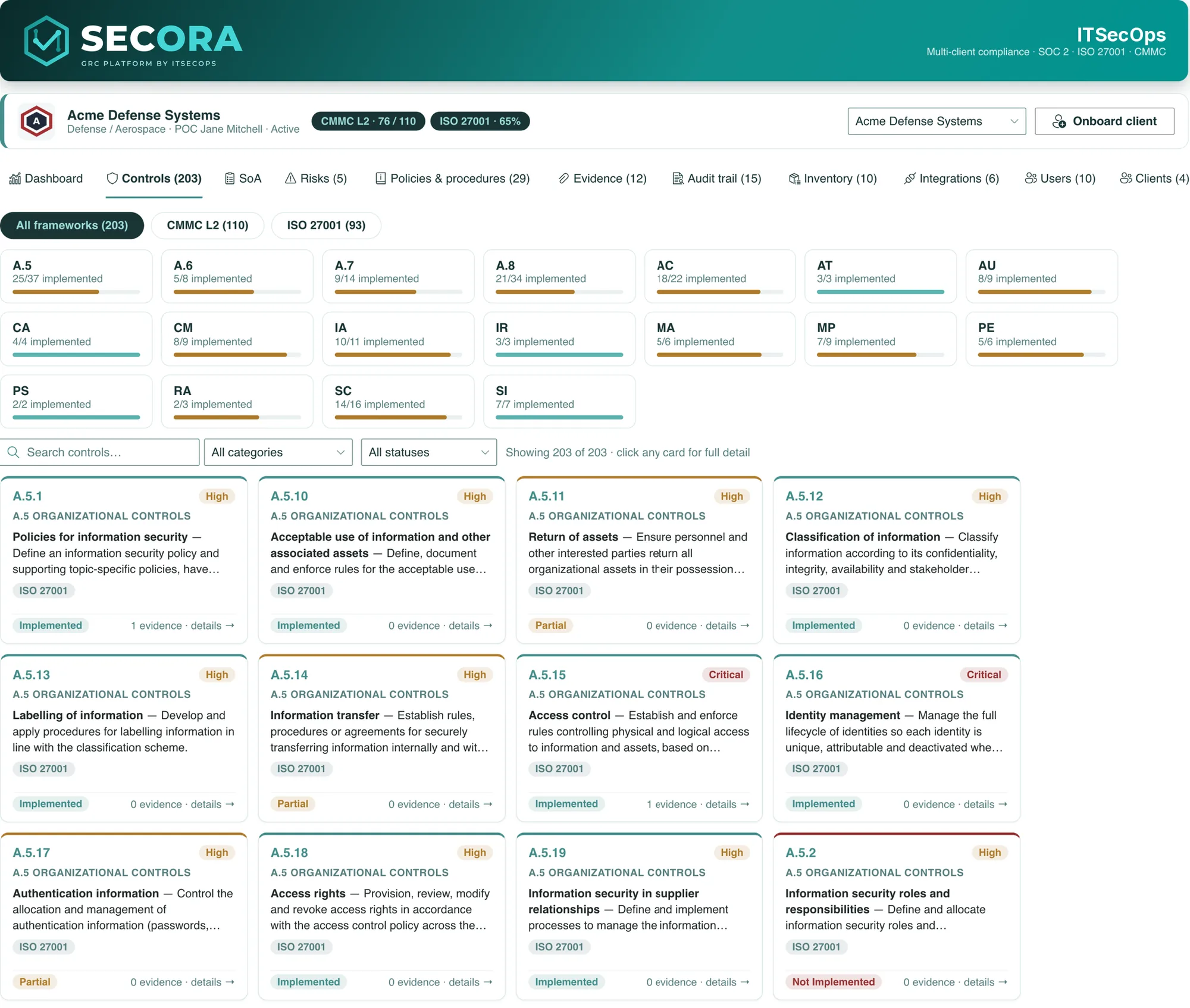
- Controls with family roll-ups, owners, priorities, SPRS weights, linked policies and evidence counts, mapped across every framework you select.
- Policies and procedures generated from 29 client-neutral templates, merged with your scoping answers, approved by email and exported as client-branded PDFs.
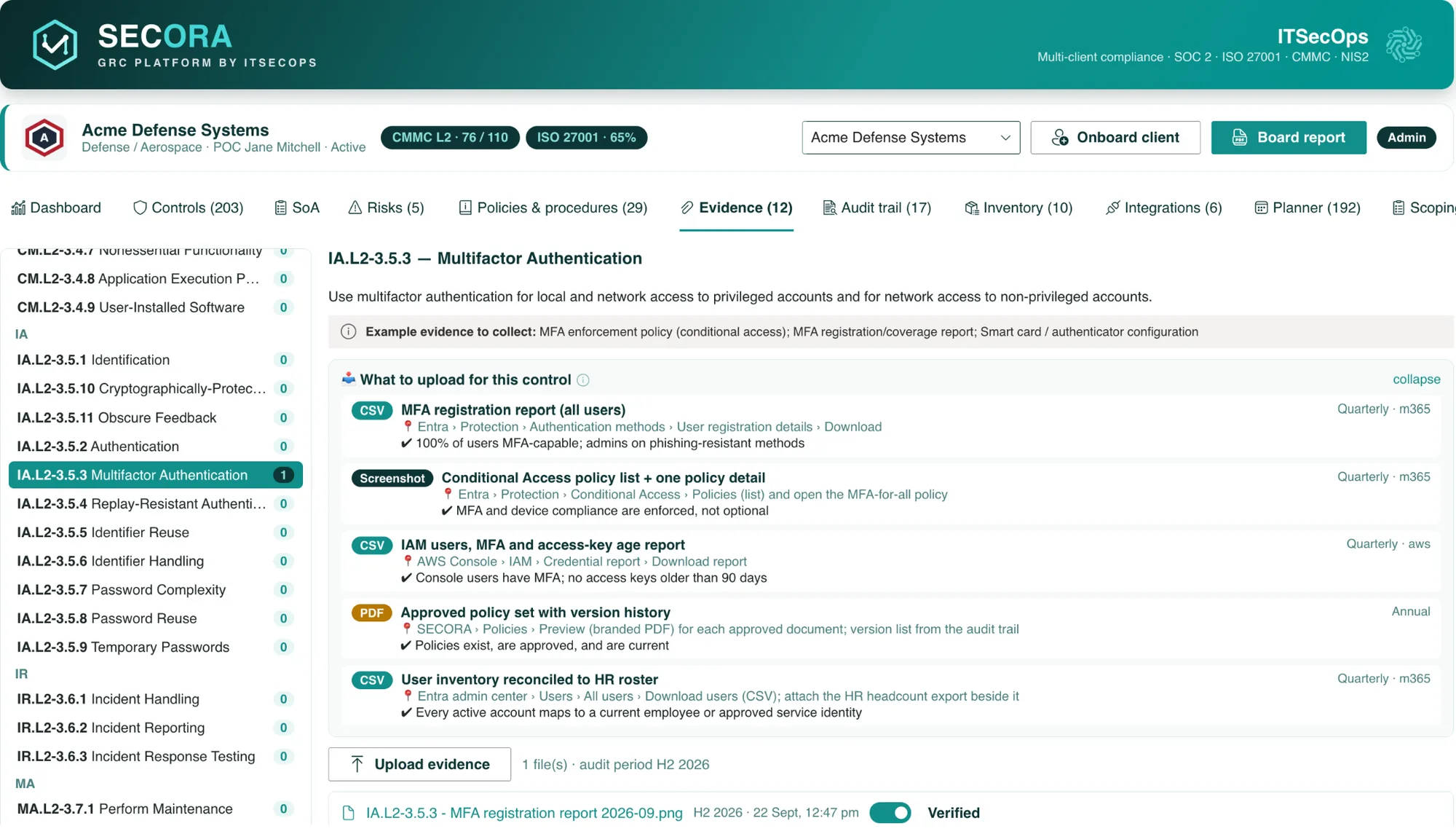
- Evidence library with a freshness clock per file, 55 evidence recipes that tell owners the exact report and menu path, and automated evidence from Microsoft 365, Entra ID and Sentinel.
- Risk register with a 5×5 heatmap, mitigation tracking and control mapping.
- Compliance calendar that turns 45 recurring duties into dated tasks with owners and reminders sent through Microsoft Graph.
- Scoping questionnaire, consistency check, roadmap, inventory, append-only audit trail and one-click board report.
What SECORA costs
SECORA is licensed per organisation. You pay a one-time deployment fee that covers installation in your tenant, framework configuration, policy library seeding, dashboard customisation and hand-over, with twelve months of maintenance, updates and support by ITSECOPS included. There are no per-user, per-month or per-framework charges, and an optional maintenance renewal is available from year two. Because there is nothing to export at exit (the lists are already yours), there is no lock-in either. Model your own numbers in the three-year GRC cost calculator or request a written quote.
Sources: Vendr: Drata pricing data · CostBench: Drata hidden costs · Help Net Security: Drata AI agent governance, Jun 2026 · Orbiq: Vanta vs Drata. Competitor figures are observed contract data or published estimates, not list prices; verify with the vendor.
Frequently asked
Over three years, usually by a wide margin in the modelled scenario: Drata is a recurring subscription with 5 to 10% uplifts and first-year extras, SECORA is a one-time deployment plus an optional 15% maintenance renewal. Use the GRC cost calculator with your own Drata quote; the exact SECORA price depends on frameworks and estate size.
As of September 2026 no publicly documented EU residency option was found; Drata runs on US infrastructure. SECORA stores everything in your tenant, so residency follows your Microsoft geography.
For Microsoft 365, Entra ID and Sentinel, yes, natively and read-only. For AWS, Azure, Google Cloud, GitHub and SIEMs a separate headless collector holds credentials outside SharePoint. Where automation is not worth it, 55 evidence recipes give owners the exact export to upload.
In your own Microsoft 365 tenant or SharePoint Server: SharePoint lists for controls, policies, risks, tasks, inventory and the audit trail, and a versioned document library for evidence. SECORA has no cloud of its own and no vendor database.
No. SECORA is licensed per organisation with a one-time deployment fee and twelve months of maintenance included. Invite every control owner, department head and external auditor without changing the bill.
See SECORA running in your own tenant
Walkthrough slots, deployment scope and a written quote within 1 business day.