 SEC
SEC by ITSECOPS
What is in the calendar
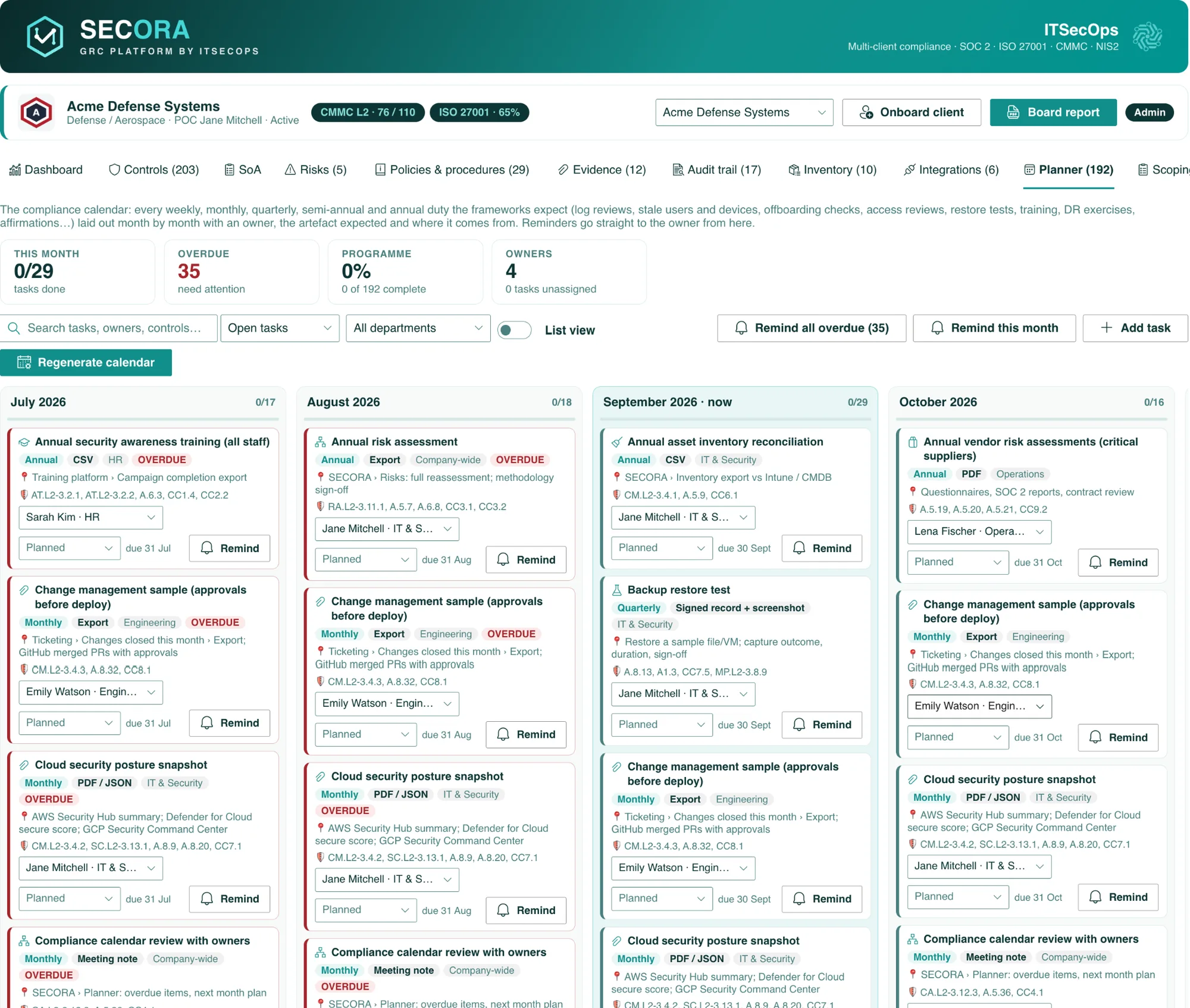
The catalogue mirrors the SECORA planner: 45 recurring duties across weekly, monthly, quarterly and annual cadences, each with a department owner and the artefact an auditor accepts. Examples: weekly SIEM alert triage review (Sentinel export), monthly stale user and device review (Entra sign-in report, Intune compliance export), monthly change management sample (ticketing export, merged pull requests with approvals), quarterly backup restore test (signed record plus screenshot), quarterly privileged and user access reviews, quarterly MFA coverage and Conditional Access policy review, annual risk assessment, annual vendor risk assessments, annual incident response tabletop and DR exercise, annual policy re-approval, internal audit and management review for ISO, SSP and POA&M refresh and SPRS affirmation for CMMC, records of processing and DSR log review for GDPR, business associate agreement review and ePHI audit log review for HIPAA, supply-chain check-ins and management briefings for NIS2.
Filtered by your estate
A Microsoft 365 client gets Purview, Entra and Sentinel exports; an AWS client gets CloudTrail and IAM credential reports; an on-premises client gets firewall rule reviews, media sanitisation and physical access log checks. The generator applies the same filter SECORA uses when it seeds the planner from your inventory, so owners are never asked for an Azure export they cannot produce.
How SECORA runs this calendar for you
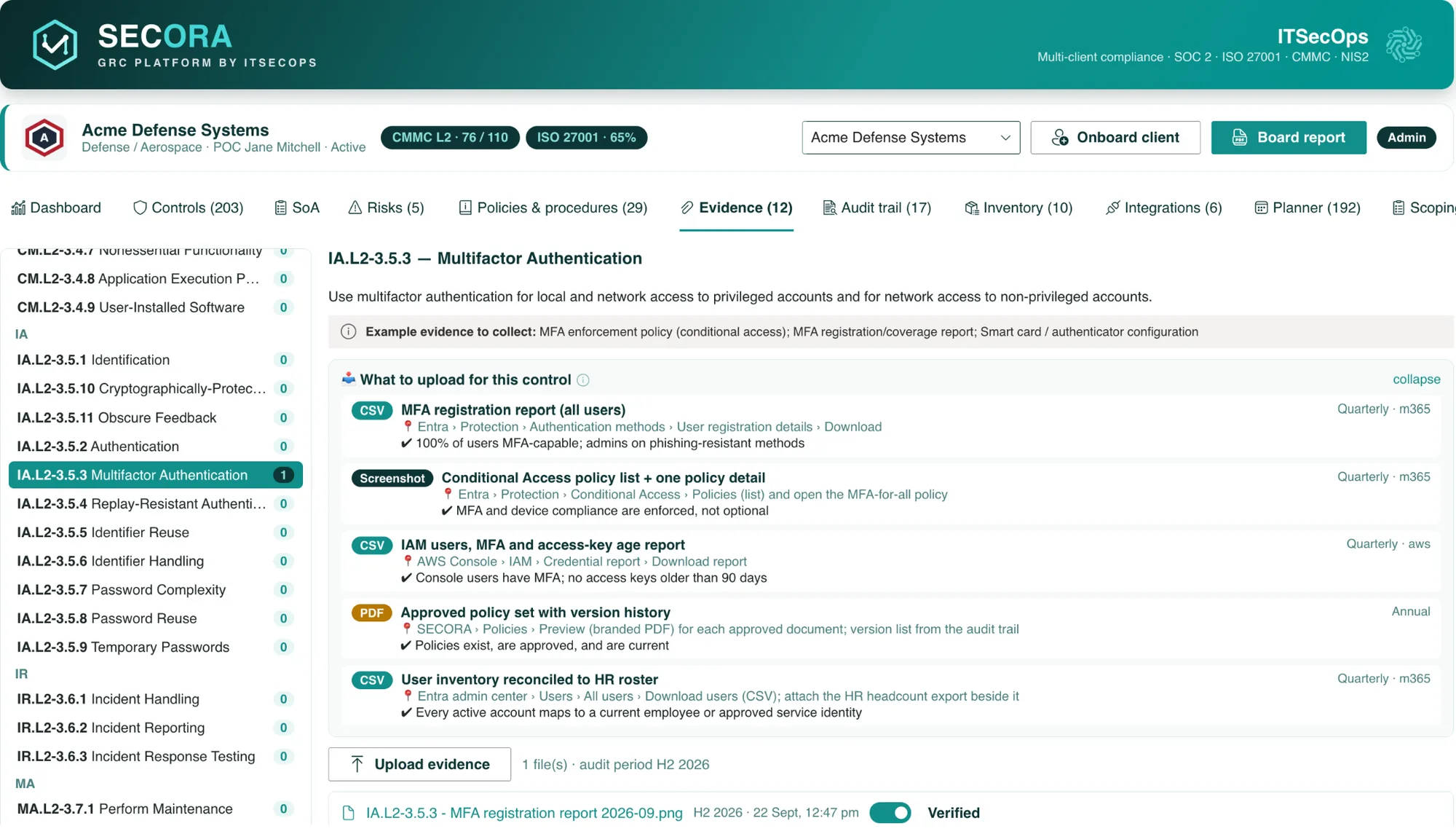
Inside SECORA every task carries the cadence, the artefact format, the source path, the controls it evidences, the owner from the users register (with the client POC as fallback) and a Remind button. Reminders are previewed and sent from the sender’s mailbox through Microsoft Graph, stamped on the task and written to the audit trail. Overdue items turn red on the card, the dashboard tile and the board report. Done means the artefact is in the evidence library, mapped to the controls the task lists. Regenerate when the estate or timeline changes; completed tasks are never touched.
What SECORA costs
SECORA is licensed per organisation. You pay a one-time deployment fee that covers installation in your tenant, framework configuration, policy library seeding, dashboard customisation and hand-over, with twelve months of maintenance, updates and support by ITSECOPS included. There are no per-user, per-month or per-framework charges, and an optional maintenance renewal is available from year two. Because there is nothing to export at exit (the lists are already yours), there is no lock-in either. Model your own numbers in the three-year GRC cost calculator or request a written quote.
Frequently asked
Type II tests operating effectiveness over an observation window, so auditors sample recurring evidence: access reviews, change management approvals, vulnerability and patch management, backup restore tests, incident response exercises, vendor reviews, security awareness training and risk assessment. The generator schedules each with a cadence, owner and artefact.
Annex A does not fix cadences, but certification bodies expect at least annual risk assessment, internal audit, management review, policy review and awareness training, quarterly or more frequent access and privileged access reviews, and continuous logging and monitoring evidence. The calendar reflects those norms.
Continuous monitoring evidence for the 110 practices: log reviews, account management, configuration changes, vulnerability scanning, incident response testing, awareness training including insider threat, SSP and POA&M maintenance and the annual SPRS affirmation. Phase 1 self-assessment duties still apply after the July 2026 Phase 2 suspension.
Yes. After unlocking with a work email you can download the generated calendar as CSV to import into Planner, Outlook or Jira. SECORA customers get the same calendar generated inside their tenant with owners, reminders and evidence links.
See SECORA running in your own tenant
Walkthrough slots, deployment scope and a written quote within 1 business day.