 SEC
SEC by ITSECOPS
Sprinto competes on price. SECORA competes on ownership. The table below shows where each wins for a Microsoft-based organisation with one to four frameworks in scope.
Sprinto in 2026: pricing model, hosting and what buyers report
Pricing model. Sprinto sells scope-based bundles through a sales process; published estimates put entry bundles at $7,500 to $10,000 and typical contracts between $8,000 and $30,000 a year. Quotes rise with frameworks and integrations, and audits are procured separately.
Hosting. Vendor cloud on AWS, headquartered in India with US and EU customers. No customer-tenant or self-hosted option.
What Sprinto does well. Aggressive pricing against Vanta and Drata, quick SOC 2 and ISO 27001 for startups, responsive support and a growing integration list. For a 30-person SaaS startup with no Microsoft estate it is a sensible first GRC tool.
Where SECORA is different
A purchase, not a subscription. SECORA’s one-time deployment fee includes configuration, policy seeding and twelve months of maintenance. There is no renewal conversation for the platform itself, only an optional maintenance renewal.
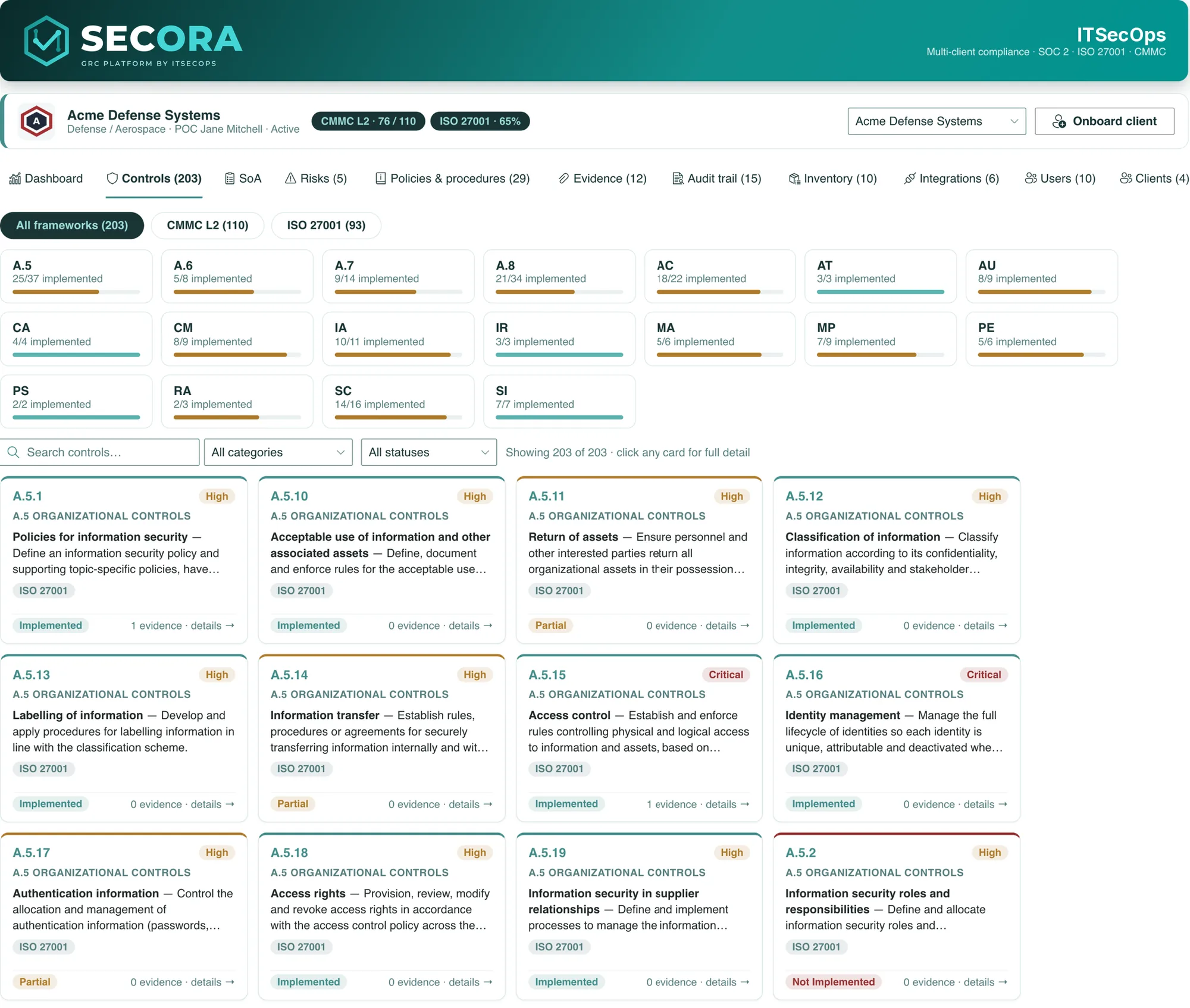
Built for the Microsoft estate and regulated work. Entra ID sign-in, Conditional Access, Purview audit, retention labels and DLP apply automatically. CMMC Level 2 ships with 800-171A assessment objectives and official SPRS scoring; ISO 27001 ships with a live Statement of Applicability; NIS2 ships with Article 21 measures mapped to the shared control library.
Consultant-deployed. ITSECOPS runs the discovery workshop, deploys, seeds and hands over, then maintains the package for a year, with optional vCISO coaching. Startups that outgrow a self-serve tool get a practitioner-run programme instead.
Side by side: SECORA vs Sprinto
| Capability | SECORA | Sprinto |
|---|---|---|
| Where your data lives | Your Microsoft 365 tenant or SharePoint Server | Sprinto cloud (AWS) |
| Pricing model | One-time deployment per organisation | Scope-based annual bundle, sales-led |
| Per-user fees | None | Bundled by scope; grows with frameworks and integrations |
| Renewal | Optional maintenance only | Annual subscription renewal |
| CMMC 800-171A and SPRS | Yes, official scoring | Limited |
| ISO 27001 SoA | Live, auditable view | Yes |
| NIS2 Article 21 mapping | Yes | Framework available |
| AI processing of evidence | No | Automated evidence with AI positioning |
| Sign-in | Entra ID, your Conditional Access | Sprinto accounts or SSO |
| Deployment | Fixed-scope by ITSECOPS | Self-serve with support |
| Multi-client edition | Yes | Partner programme |
| Exit | Nothing to export | Export and lose history |
Choose SECORA if you are on Microsoft 365, need CMMC, NIS2 or a defensible ISO 27001 SoA, and want one price with unlimited users inside your own tenant. Choose Sprinto if you are a small cloud-native startup that wants the lowest first-year SaaS price and a quick SOC 2.
Cheap in year one is not the same as owned in year three.
Three-year cost: Sprinto against SECORA
Take the Sprinto figure that matches your quote, set your headcount and frameworks, and the GRC cost calculator models three years of subscription with the usual renewal uplift against a one-time SECORA deployment plus optional maintenance. In the brochure scenario (one-time deployment at 1.2× the first-year subscription, 15% maintenance renewal from year two, 8% SaaS uplift with seat growth) the three-year total is roughly half. Your quote depends on scope, frameworks and estate size.
Moving from Sprinto to SECORA
- Export Sprinto policies, control statuses, risks and evidence.
- Discovery workshop to map frameworks, departments and estate.
- Deploy in your tenant, seed frameworks and the policy library, import inventory by CSV.
- Re-upload evidence once, mapped to every framework, with the freshness clock running.
- Hand-over and 12 months of maintenance by ITSECOPS.
How SECORA works in your tenant
SECORA is a signed SharePoint Framework (SPFx) package. ITSECOPS uploads it to your Microsoft 365 App Catalog (or a SharePoint Server you host), provisions a Compliance site with the GRC lists and an evidence library, applies permissions and seeds your frameworks. From then on your team signs in with Entra ID, under your MFA and Conditional Access, and every control, policy, risk, task and piece of evidence is a SharePoint record in your own Microsoft geography.
- Controls with family roll-ups, owners, priorities, SPRS weights, linked policies and evidence counts, mapped across every framework you select.
- Policies and procedures generated from 29 client-neutral templates, merged with your scoping answers, approved by email and exported as client-branded PDFs.
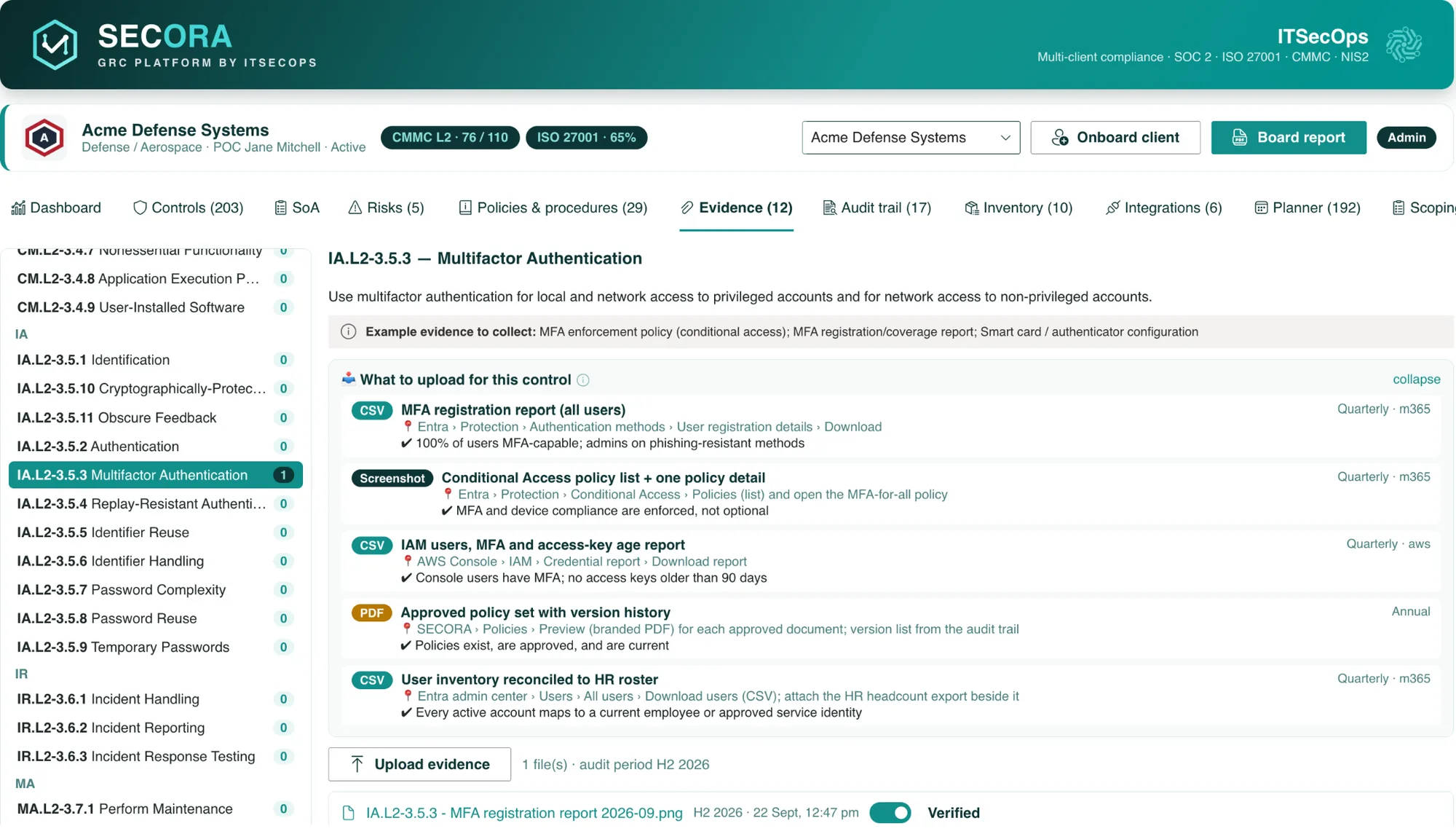
- Evidence library with a freshness clock per file, 55 evidence recipes that tell owners the exact report and menu path, and automated evidence from Microsoft 365, Entra ID and Sentinel.
- Risk register with a 5×5 heatmap, mitigation tracking and control mapping.
- Compliance calendar that turns 45 recurring duties into dated tasks with owners and reminders sent through Microsoft Graph.
- Scoping questionnaire, consistency check, roadmap, inventory, append-only audit trail and one-click board report.
What SECORA costs
SECORA is licensed per organisation. You pay a one-time deployment fee that covers installation in your tenant, framework configuration, policy library seeding, dashboard customisation and hand-over, with twelve months of maintenance, updates and support by ITSECOPS included. There are no per-user, per-month or per-framework charges, and an optional maintenance renewal is available from year two. Because there is nothing to export at exit (the lists are already yours), there is no lock-in either. Model your own numbers in the three-year GRC cost calculator or request a written quote.
Sources: SOC2Auditors: Sprinto pricing · Orbiq: Vanta alternatives · G2: small business security compliance. Competitor figures are observed contract data or published estimates, not list prices; verify with the vendor.
Frequently asked
In year one Sprinto’s entry bundles can be lower than a SECORA deployment. Over three years SECORA is usually lower because there is no subscription and no uplift; the calculator shows both curves for your numbers.
SECORA requires Microsoft 365 or SharePoint Server. Google Workspace-only organisations should look at Sprinto, Vanta or Drata, or at ITSECOPS compliance readiness services.
In your own Microsoft 365 tenant or SharePoint Server: SharePoint lists for controls, policies, risks, tasks, inventory and the audit trail, and a versioned document library for evidence. SECORA has no cloud of its own and no vendor database.
No. SECORA is licensed per organisation with a one-time deployment fee and twelve months of maintenance included. Invite every control owner, department head and external auditor without changing the bill.
See SECORA running in your own tenant
Walkthrough slots, deployment scope and a written quote within 1 business day.